NVIDIA OpenShell on AWS: Your Agent, Your Rules
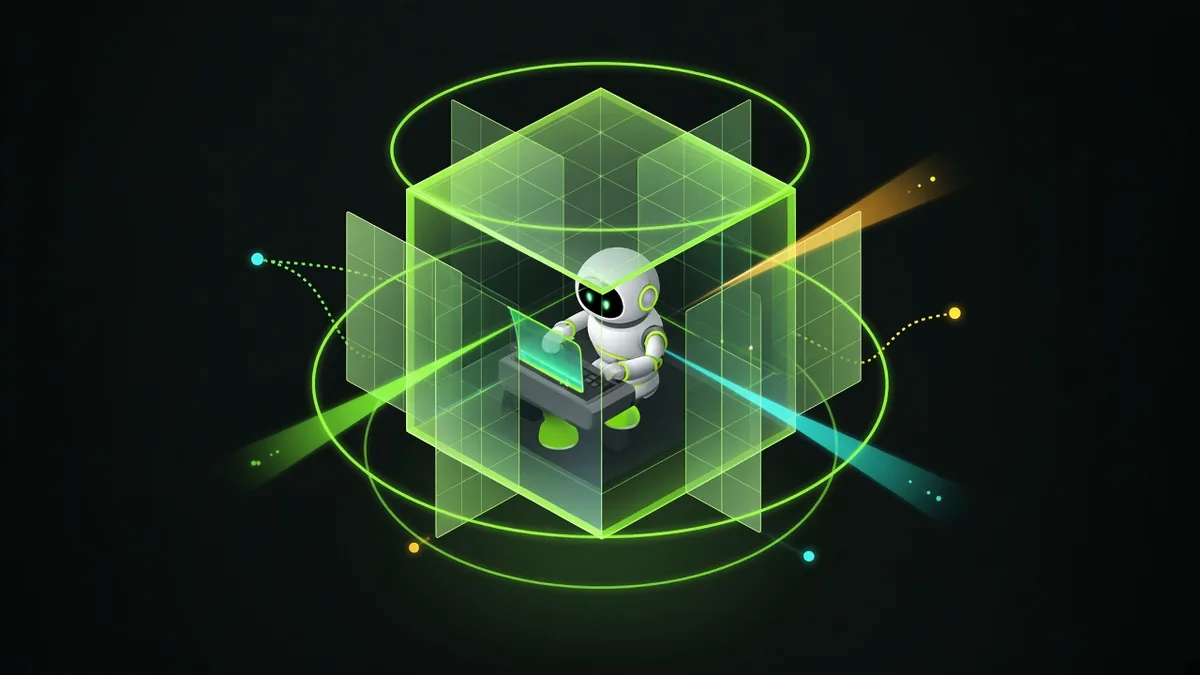
Your agent can read files, run commands, and call services. That is why it is useful. It is also the risk. A wrong tool call runs with whatever access the machine gives it, and a prompt that says "stay in this folder" is only a request.
NVIDIA OpenShell turns that request into a rule. It runs the agent's workload in a sandbox, and a policy decides which files it can write, which processes it can run, and which network endpoints it can reach. This post shows how the pieces fit, how to start a first sandbox on our AWS image, and a recorded run where a real model-backed agent finished a task and then hit the boundary.
This is an independent guide by Software Sushi. It is not affiliated with, sponsored by, or endorsed by NVIDIA.
Four pieces, four different jobs
OpenShell is not an AI model. It helps to separate the part that decides, the part that acts, and the place where the actions run. NVIDIA's OpenShell overview has the upstream product description.
- Model: decides the next action. It generates responses and proposes tool calls. It can run at a hosted provider or on a private model server.
- Agent: uses the tools. It connects the model to a workflow. It reads files, runs commands, calls services, and returns the results for the next decision.
- OpenShell: controls execution. It runs the workload in a sandbox with policy boundaries for files, processes, and network connections.
- Software Sushi: prepares the AWS starting point. Our AMI combines Ubuntu, Docker, and OpenShell with a versioned build recipe, AWS setup, and a customer guide. You configure the model, its subscription, and your API keys after launch.
The model can run outside the sandbox while the agent's tools run inside it. In that case, the network policy must also allow the connection to the model endpoint.
A safe place for your agents to work
OpenShell adds a runtime boundary around the agent's actions. The policy governs the files, processes, and connections that the workload can use.

- Files: the workload can write in the sandbox workspace. In our demo, the operating system denied a write outside it.
- Processes: the workload gets its own CPU and memory limits.
- Network: the workload can reach only the endpoints that the policy allows, including the model endpoint.
A blocked action is a system denial, not a model refusal. The boundary holds even when the model chooses the wrong tool. NVIDIA's architecture documentation explains how the gateway, the trusted supervisor, and the sandbox cooperate. The supervisor checks requests against the policy, and the sandbox contains the agent's processes.
The rules need to match the real workflow. Allow the workspace and the service endpoints that the task needs, inspect denied actions, and review changes before you widen access. An administrator who controls the host still has responsibilities outside the agent's boundary.
How a request travels on the Sushi AMI
An Amazon Machine Image is a reusable starting image for an EC2 instance. It contains the software that the machine needs to boot. It does not run an agent by itself. When you launch the image, you get an instance in your own account, and the OpenShell gateway on that instance creates and manages sandboxes.

One AMI can launch several independent instances. A newer image does not update machines that are already running. The tested setup uses a CPU instance for the agent runtime, and the model in our demo ran on a separate machine.
Start your first sandbox on the AMI in about fifteen minutes
These steps run on an EC2 instance launched from the Sushi OpenShell AMI. They come from the Sushi OpenShell getting-started guide. You type every command in your own terminal while you are connected to the instance. The first run needs no model-provider key.
1. Subscribe and launch
Open the Sushi OpenShell listing, subscribe, and launch the image. Keep the recommended t4g.medium instance type. The image is ARM64, so it needs a Graviton instance type. Set the root volume to at least 32 GiB.
2. Connect
To connect with no inbound ports, use Session Manager and switch to the ubuntu user. To connect with SSH, allow port 22 only from your administrative address.
sudo -iu ubuntu
# or
ssh -i <your-key.pem> ubuntu@<public-ip>
3. Wait for first boot
The instance creates its own TLS identity and starts the gateway. This takes a minute or two after the instance shows Running.
sudo cloud-init status --wait
sudo systemctl status sushi-openshell --no-pager
4. Check the gateway
When the gateway is ready, openshell status reports Status: Connected.
openshell --version
openshell status
5. Run the walkthrough script
The script creates a small sandbox, runs a command inside it as a non-root user, inspects the sandbox, and removes it. A successful run ends with SUSHI_CUSTOMER_DEMO_PASSED.
bash /opt/sushi/docs/demo.sh6. Try it yourself
Create a sandbox with one CPU and 256 MiB of memory, run a command inside it, and delete it.
openshell sandbox create --name demo --cpu 1 --memory 256Mi --detach -- /bin/sleep 600
openshell sandbox exec -n demo --no-login-shell -- /bin/echo hello-from-sandbox
openshell sandbox delete demo
Next, the Sushi OpenShell documentation covers how to connect an agent and a model provider.
Running OpenShell on your own machine instead? This guide covers only the AMI. To install OpenShell locally, follow NVIDIA's OpenShell installation guide and then Run Your First Agent. There is also a recorded local run below.
The recording runs on a Mac. A small open source console calls the real openshell command line, and the model runs on a separate GPU machine on the same network. You see the policy, a report that the agent writes from a sample CSV, three denials, one rule that we approve, and the cleanup.
Read the local run transcript
00:00–00:12 · Meet the console. This is OpenShell, NVIDIA's open source runtime for sandboxed AI agents. The web page is our small demo console, which runs the OpenShell command line.
00:12–00:19 · Read the policy. Our policy starts from default deny.
00:19–00:27 · Create the sandbox. We start the sandbox with our policy and a sales file.
00:27–00:34 · Give the agent a task. The agent analyzes the data, using the model on our own GPU box.
00:34–00:42 · Read the report. It writes a report.
00:42–00:49 · Try a write outside the workspace. It tries to write to /etc. OpenShell blocks it.
00:49–00:57 · Try the network. It tries a public website. OpenShell denies that too.
00:57–01:04 · Approve one rule. OpenShell proposes a narrow rule, and we approve just that site.
01:04–01:12 · Fetch again. Now the same request succeeds.
01:12–01:19 · Clean up. Finally, we delete the sandbox.
Try the local console yourself
The console is in the public openshell-sandbox-console repository under the MIT license. Its README describes two setups:
- Local: macOS or Linux with Docker, NVIDIA's install script, and your own Ollama or other model endpoint.
- Cloud: the Software Sushi OpenShell AMI, with the steps from the Sushi OpenShell documentation.
The console listens on 127.0.0.1 only. Its endpoints run the OpenShell CLI, so never expose the console on a public address. The console is an independent project. It is not affiliated with or endorsed by NVIDIA.
Watch the steps on a real instance
This 3-minute-26-second recording starts with a fresh instance from the AMI. The installed OpenShell runtime started, and its smoke checks passed. You see the real openshell term dashboard, the sandbox setup, five model responses, a verified CSV report, the denied outside write, and a scoped cleanup.
Read the full terminal walkthrough transcript
00:00–00:20 · What you will do. Let's use OpenShell on AWS, packaged by Software Sushi. In this walkthrough, we connect to an instance, create a controlled workspace, and let an AI agent turn a small CSV into a report. Then we check a permission boundary and clean up. You will see the actual terminal and its live results.
00:20–00:42 · Start and connect. Start with an instance from the OpenShell image and your approved AWS access. The connection in this example uses Systems Manager, so there is no public SSH port to open. We first check that the service started automatically and that the gateway responds. Keep credentials and account details out of your recording.
00:42–01:03 · Watch the live dashboard. This is OpenShell's terminal dashboard. It gives you a live view of the environment, including the gateway and your sandboxes. The panel is useful for watching a workspace become ready and inspecting its state. OpenShell supplies the controlled runtime. The model and the agent that uses it are separate pieces.
01:03–01:27 · Create a bounded workspace. Here we create one sandbox for the example. It has one CPU and two hundred and fifty-six megabytes of memory. Its policy allows work in the sandbox directory and one reviewed model route. We wait for the configuration to settle before starting the agent. These limits belong to this demonstration, and you can choose appropriate limits for your own workload.
01:27–01:51 · Give the agent a task. The input is a CSV with three tasks. Our small Python agent asks a real model to choose from four reviewed tools. Watch the output as the model reads the CSV, writes a Markdown report, and checks it against the original data. The model serves the requests from an existing private connection; it is not installed inside this AMI.
01:51–02:15 · Inspect the real result. Now open the report the agent actually wrote. It lists the three tasks and adds their durations to sixty seconds. That number comes from the sample data; it is not a performance benchmark. The independent check compares each row and the total against the CSV. This gives us an observable result, rather than just a completion message.
02:15–02:38 · See a boundary enforced. The last test attempts one harmless write outside the approved workspace. Look for the permission-denied result from the operating system. The useful task can finish inside its allowed directory, while this outside write is rejected. This demonstrates the file boundary exercised in this example. It does not stand in for testing every possible policy or agent.
02:38–03:00 · Remove the example resources. When the task is finished, delete the named sandbox and check that it is absent from the list. Remove the example's model connection and any temporary tunnels as well. Sandbox deletion and terminating the AWS instance are separate steps. The walkthrough keeps the resource names scoped so cleanup affects only this demonstration.
03:00–03:26 · Repeat the workflow. You can follow the included guide to repeat this workflow with your approved image and model provider. Keep the model connection private, give the agent only the tools it needs, and inspect the outputs and the policy results. Software Sushi packages the AWS environment; OpenShell applies the runtime boundaries. The guide, commands, captions, and source recording are included with this video.
Two shorter clips are also on YouTube: a 58-second introduction to the four pieces and a 1-minute-47-second cut of the agent task.
What the recorded task proved
We ran a small Python agent inside OpenShell. It used an existing Qwen model on Thor through a private connection and got five real model responses. The model chose tools that read a sample CSV, wrote a report, checked the report against the data, and tried one harmless write outside the allowed workspace.
| Check | Observed result | Meaning |
|---|---|---|
| Model and tools | Five model responses; real CSV read, report write, and verification. | A model-backed agent executed the tools inside the sandbox. |
| Report contents | Three sample tasks with durations totaling 60 seconds. | The total describes sample data. It is not an execution-speed benchmark. |
| Outside write | The operating system returned permission denied (EACCES). | The attempted write was blocked by the runtime boundary. |
| Positive control | The same image and user could write to that path without OpenShell. | The comparison distinguishes policy enforcement from ordinary filesystem permissions. |
We supplied the Python agent image separately for this demo. It is not part of the base AMI. The run used a private model route with no credentials, so it did not test API-key injection. It validates this workflow and this policy, not every model, agent, or authentication path.
Choose your model and credentials separately
A hosted model service may need its own API credentials and billing account. You can also use a private model, as long as the agent can reach its endpoint. The AMI includes no customer keys and no model weights.
OpenShell's provider mechanism ties credentials to approved endpoints. Both the provider configuration and the sandbox's network policy must allow the request. The inference guide explains why a service that uses an OpenAI-compatible protocol still needs a profile for its real destination.
Configuring a provider is a setup step. A successful model response is a separate check. Keep credentials out of image recipes, source files, recordings, and support messages. EC2 infrastructure and model-service costs are separate from the software price.
Questions before your first workflow
Does the model have to run on the EC2 instance?
No. In our demo, the agent ran inside the AWS sandbox, and the model ran on Thor. Your deployment can use a hosted service or a private model endpoint, with the required policy and connectivity.
Can I bring my own agent?
Yes, as a containerized workload. You prepare the agent's dependencies, tools, model configuration, and policy for that workload. NVIDIA's pinned OpenShell source describes the minimal default image, which has no agent installed.
Can I run OpenShell without AWS?
Yes. NVIDIA publishes OpenShell itself, and NVIDIA's installation guide covers running it on your own machine. The Sushi AMI is a prepared starting point on AWS.
Give the workflow a clear boundary
Start with a useful task. Choose the model and the agent, and then define what the tools need to access. The demo shows the full loop: a model makes decisions, the tools produce a verified result, and an out-of-policy action is denied.
For help with your own workflow, see our LLM development services and AI pilot-to-production services, read why AI pilots stall before production, or book a discovery call. To try it now, launch Sushi OpenShell from AWS Marketplace.